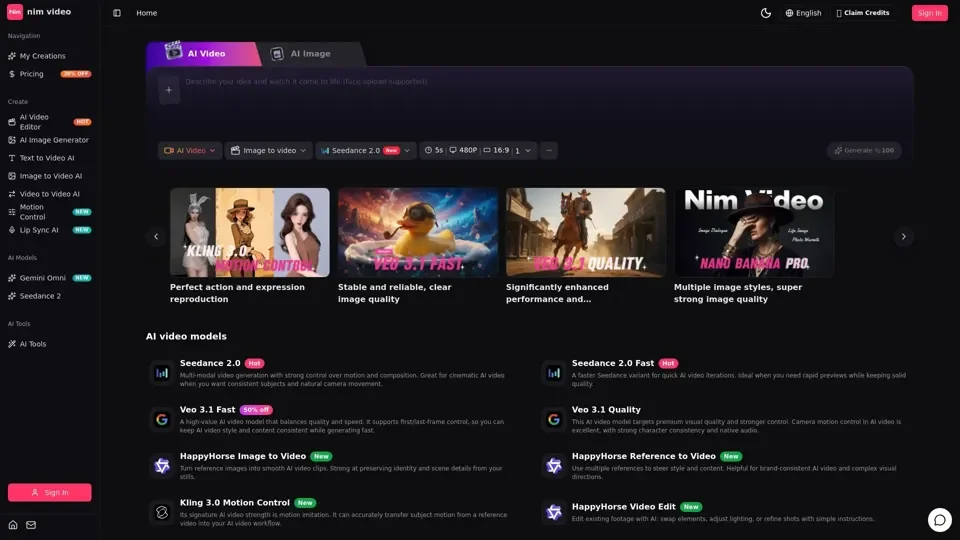
What is Nim Video AI
Nim Video AI is an AI-driven platform that provides access to a vast array of AI technologies for various needs, including AI video and image creation. It offers multiple AI models, one studio for AI video and AI images, allowing users to move from prompt to reference, generation, editing, and reuse without leaving the creative flow.
Feature of Nim Video AI
-
Multiple AI Models: Nim Video AI brings leading AI video and AI image models into one focused studio.
-
AI Video Generation: It offers various AI video models, including Veo 3.1 Fast, Veo 3.1 Quality, Kling 3.0 Motion Control, and Wan 2.7 Video.
-
AI Image Generation: It provides AI image models, including Nano Banana, Nano Banana Pro, GPT Image 2, and FLUX.
-
Image-to-Video: It allows users to turn reference images into smooth AI video clips.
-
Video Editing: It enables users to edit existing footage with AI: swap elements, adjust lighting, or refine shots with simple instructions.
How to Use Nim Video AI
Every user can utilize Nim Video AI's models for free up to a certain limit. Subscribing to the platform grants additional benefits and extended access beyond the free usage limits. Users can choose the right model based on their needs and create AI videos and images using the platform's intuitive interface.
Price of Nim Video AI
The pricing of Nim Video AI is not explicitly stated, but it offers affordable and high-value AI video and image models. Some models, such as Nano Banana and FLUX, are described as affordable, while others, like Veo 3.1 Quality, are premium.
Helpful Tips for Using Nim Video AI
-
Choose the Right Model: Select the AI model that best fits your needs and creative goals.
-
Experiment with Different Models: Try out various AI models to find the one that works best for your project.
-
Use Reference Images: Use reference images to steer style, subject, and motion in your AI video creations.
-
Edit and Refine: Edit and refine your AI-generated videos and images to achieve the desired outcome.
Frequently Asked Questions
-
How do I choose the right model on Nim Video?: Choose the model that best fits your needs and creative goals.
-
What can I do end-to-end on Nim Video?: You can plan, generate, compare, review, and ship video assets faster using Nim Video AI.
-
Can I turn a generated AI image into a video?: Yes, you can turn a generated AI image into a video using Nim Video AI's image-to-video models.
-
What is Nim Video?: Nim Video is an AI-driven platform for AI video and image creation.
-
Is Nim Video only for text-to-video?: No, Nim Video offers a range of AI models for various creative workflows, including text-to-video, image-to-video, and video editing.