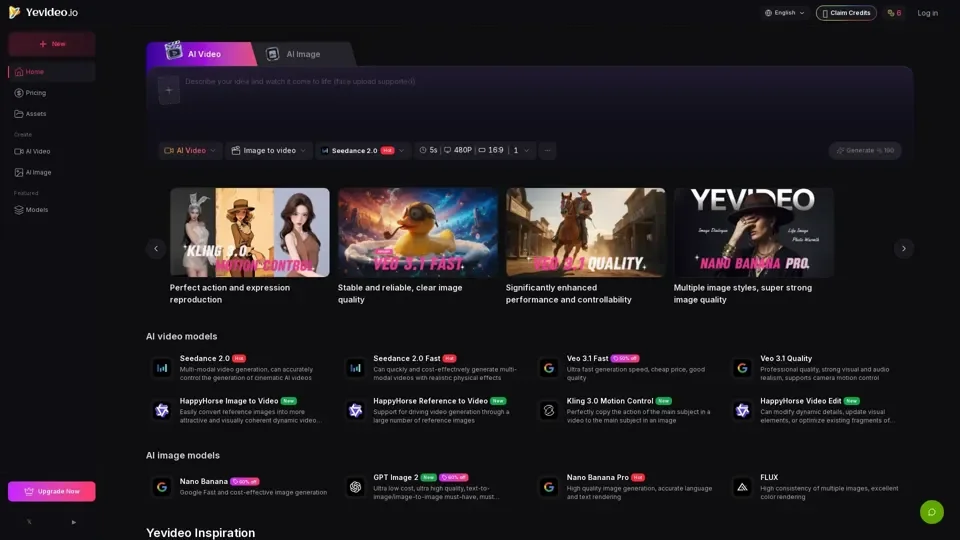
What is Yevideo AI
Yevideo AI is an all-in-one AI video and image generation platform that integrates multiple models to support various creative needs. It offers a range of tools and features for generating high-quality AI videos and images, including text-to-image, image-to-image, text-to-video, image-to-video, video-to-video, and AI video editing capabilities.
Features of Yevideo AI
The key features of Yevideo AI include:
-
Multiple AI Models: Yevideo AI offers a variety of AI models, each with its strengths and specialties, such as Seedance 2.0, Veo 3.1, Kling 3.0, Nano Banana, and more.
-
AI Video Generation: Users can generate AI videos using text, images, or other videos as input, with options for controlling aspects like motion, style, and audio.
-
AI Image Generation: The platform allows for the creation of AI images from text or other images, with models like Nano Banana and GPT-4o Image offering high-quality results.
-
AI Video Editing: Yevideo AI provides tools for editing AI-generated videos, enabling users to refine their creations by adjusting elements such as objects, environments, and effects.
-
Commercial Use: Subscribers to paid plans can use the generated AI content commercially, making Yevideo AI a valuable resource for businesses and professionals.
How to Use Yevideo AI
To get started with Yevideo AI, users can follow these steps:
-
Choose a Model: Select the appropriate AI model based on the desired output, whether it's an AI video or image, and consider factors like motion imitation, text rendering, and style.
-
Input Your Idea: Use text, images, or videos as input to generate your AI content, depending on the chosen model and desired outcome.
-
Refine Your Creation: Utilize the platform's editing tools to adjust and refine your AI-generated content, ensuring it meets your needs and expectations.
Pricing and Credits
Yevideo AI operates on a credit-based system, where each generation or editing task consumes a certain number of credits, depending on the model, resolution, duration, and other settings. Users can obtain credits through:
-
Welcome Bonus: New users receive a welcome bonus to try out the platform's core features.
-
Daily Check-ins: Regular users can earn credits by checking in daily.
-
Feedback Rewards: Providing valuable feedback can result in bonus credits.
-
Paid Plans: Subscribing to a paid plan offers additional credits and the ability to use generated content commercially.
Helpful Tips
To maximize the use of Yevideo AI:
-
Explore Different Models: Try out various AI models to find the one that best suits your needs and preferences.
-
Start with Text-to-Image: Begin with text-to-image generation to visualize your idea, then iterate or refine it using image-to-image or text-to-video capabilities.
-
Use Strong First Frames: When generating videos, use a strong first frame to set the mood and style, reducing the likelihood of wasting credits on undesirable results.
Frequently Asked Questions
-
How Do I Choose the Right Model?: Read the model introduction cards to understand each model's strengths and choose based on your specific needs.
-
Can I Turn a Generated AI Image into a Video?: Yes, but you'll need to download the image first, then upload it into the image-to-video workspace.
-
How Does Pricing Work?: Credits are deducted based on the selected model and settings, with an estimated cost provided before generation.
-
Can I Use Outputs Commercially?: Yes, if you're a paid plan subscriber, you can use Yevideo AI outputs for commercial purposes, such as creating ads, marketing assets, or product explainer videos.