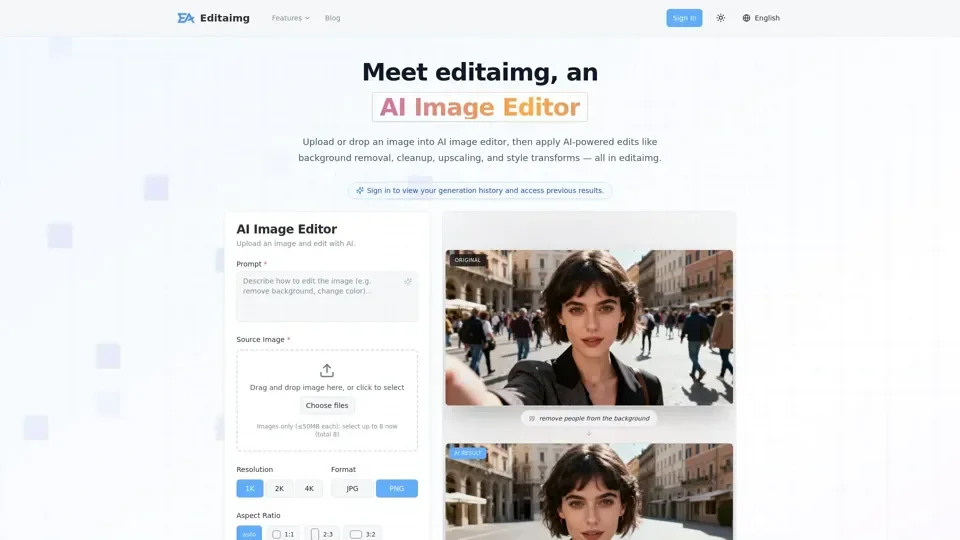
What is Editaimg
Editaimg is an AI-driven platform that provides access to a vast array of AI technologies for various needs, including AI Image Editor for image editing and enhancement. Editaimg's AI Image Editor is a powerful tool that transforms photos with a single click, applying professional-grade enhancements like background removal and upscaling.
Feature of Editaimg
The main features of Editaimg include:
-
AI Image Editor: Editaimg's AI Image Editor is a powerful tool that transforms photos with a single click, applying professional-grade enhancements like background removal and upscaling.
-
Object Removal: Editaimg's AI Image Editor can seamlessly remove objects from images, allowing users to create stunning visuals in seconds.
-
Background Changing: Editaimg's AI Image Editor can change backgrounds, allowing users to place objects in new and creative environments.
-
Intelligent Image Cleanup: Editaimg's AI Image Editor can intelligently clean up images, removing unwanted objects and noise.
-
Upscaling: Editaimg's AI Image Editor can upscale image resolution, allowing users to create high-quality images.
How to Use Editaimg
To use Editaimg, follow these steps:
-
Import Your Image: Drag and drop your file directly into Editaimg's AI Image Editor to begin.
-
Describe Your Idea: Use the prompt box to tell Editaimg's AI Image Editor exactly what you need.
-
Choose Settings: Fine-tune your output with Editaimg's AI Image Editor's advanced settings.
-
Generate Your Edit: Hit the 'Edit' button and watch Editaimg's AI Image Editor transform your photo in seconds.
Price of Editaimg
The pricing for Editaimg's AI Image Editor is as follows:
-
Basic: $9.9 USD (one-time payment) for basic AI Image Editor credits.
-
Standard: $29.9 USD (one-time payment) for standard AI Image Editor pack.
-
Pro: $49.9 USD (one-time payment) for premium AI Image Editor volume.
Helpful Tips for Using Editaimg
To get the most out of Editaimg's AI Image Editor, follow these tips:
-
Use High-Quality Images: Use high-quality images to get the best results from Editaimg's AI Image Editor.
-
Be Specific with Your Prompts: Use specific and detailed prompts to get the exact results you want from Editaimg's AI Image Editor.
-
Experiment with Different Settings: Experiment with different settings to find the perfect combination for your image editing needs.
Frequently Asked Questions about Editaimg
Here are some frequently asked questions about Editaimg's AI Image Editor:
-
What is Editaimg and how does it work?: Editaimg is a powerful AI Image Editor that transforms photos with a single click.
-
Do I need photo editing skills to use it?: No, Editaimg's AI Image Editor does not require photo editing skills.
-
What kind of edits can I make?: Editaimg's AI Image Editor can make a wide range of edits, including object removal, background changing, and upscaling.
-
How long does it take to see results?: Editaimg's AI Image Editor can generate results in seconds.
-
Why use Editaimg's AI Image Editor?: Editaimg's AI Image Editor is a powerful tool that can help users create stunning images in seconds, without requiring photo editing skills.
-
Can I customize the edits?: Yes, Editaimg's AI Image Editor allows users to customize their edits with advanced settings.
-
Can I use Editaimg's AI Image Editor to remove backgrounds or create white backgrounds?: Yes, Editaimg's AI Image Editor can remove backgrounds and create white backgrounds.
-
Does Editaimg's AI Image Editor work as an object remover or watermark remover?: Yes, Editaimg's AI Image Editor can remove objects and watermarks from images.
-
Can I upscale image resolution with Editaimg's AI Image Editor?: Yes, Editaimg's AI Image Editor can upscale image resolution.