What is Image to Image AI
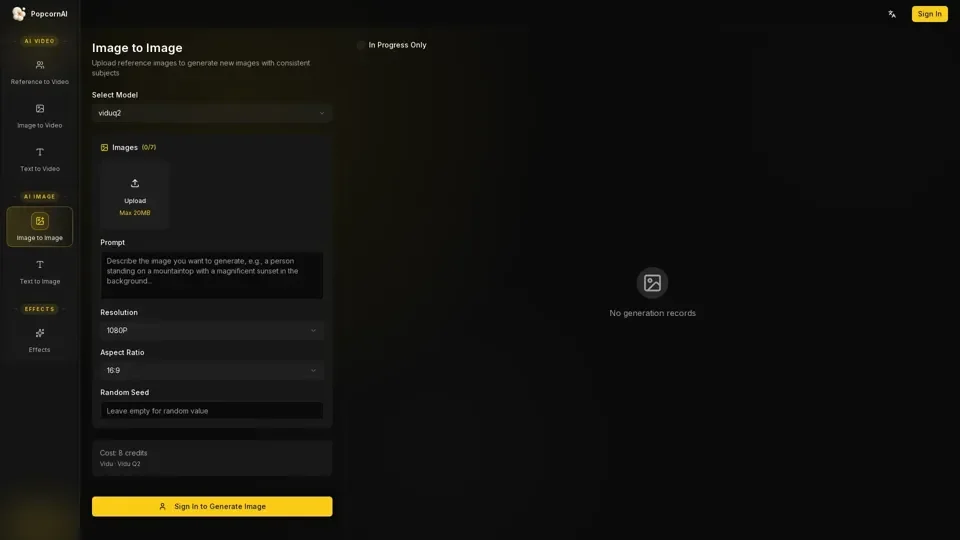
Image to Image AI is a creative tool that uses an existing image as a "blueprint" to generate new images with consistent subjects. It keeps the structure and composition of the uploaded photo but redraws it based on the user's prompt. This technology is part of the PopcornAI platform, which offers a range of AI-powered tools for image and video generation.
Feature of Image to Image AI
The key features of Image to Image AI include:
-
Upload reference images: Users can upload their own images to generate new images with consistent subjects.
-
Select models: The platform offers various models, such as viduq2, to choose from for image generation.
-
Prompt and resolution: Users can input their desired prompt and select the resolution and aspect ratio for the generated image.
-
Cost-effective: The cost of generating an image is 8 credits, making it an affordable option for creators.
-
No generation records: The platform does not store any generation records, ensuring user privacy.
How to Use Image to Image AI
Using Image to Image AI is a simple three-step process:
-
Upload your base image: Drop in any image, such as a photo, drawing, or screenshot.
-
Describe the magic: Tell the AI what to change, such as "Turn this cat into a giant robot."
-
Pop and transform: Hit generate, and the AI will keep the composition but completely change the style.
Price of Image to Image AI
The price of using Image to Image AI is 8 credits per generation. However, users can try the platform for free using their daily "Popcorns" and experiment with different styles without paying a cent.
Helpful Tips for Image to Image AI
To get the most out of Image to Image AI, follow these tips:
-
Use high-quality reference images: The better the quality of the uploaded image, the better the generated image will be.
-
Be specific with your prompt: Clearly describe what you want the AI to change or create.
-
Experiment with different models: Try out different models to see which one works best for your desired outcome.
Frequently Asked Questions about Image to Image AI
Some common questions about Image to Image AI include:
-
What is Image to Image AI?: It's a creative tool that uses an existing image as a "blueprint" to generate new images with consistent subjects.
-
How is it different from Text to Image?: Text-to-Image creates something from scratch, while Image-to-Image modifies an existing image.
-
Can I turn a sketch into a photo?: Yes, this is one of the most popular uses of Image to Image AI.
-
Do I need to know about LoRAs or models?: No, PopcornAI's Smart Style Engine automatically selects the best parameters for your prompt, so you don't need to be a prompt engineer.